Spatial Audio
Made Easy.
Make your music, podcasts, videos, and games sound like they are all around you. Drag a sound anywhere in 3D and hear it move. No hard setups. No special gear. Just headphones.
1. PODCAST: SPADIO 3D SCENE
0:00
0:00
Made for the places your audience listens and the tools you already use: Apple Music Spatial Audio, Dolby Atmos, YouTube 360, TikTok 8D, Tidal, Unity, Unreal Engine, Meta Quest, REAPER, Logic Pro, Pro Tools, Ableton Live, Nuendo, AirPods head tracking, Any headphones.
Apple Music Spatial AudioDolby
AtmosYouTube 360TikTok 8DTidalUnityUnreal
EngineMeta QuestREAPERLogic ProPro ToolsAbleton
LiveNuendoAirPods head
trackingAny headphones
How it works
3D sound in 3 easy steps.
With regular stereo, sound sits between your ears. With 3D sound, it can be in front, behind, above, or moving all around you. Listeners feel like they are inside the music, the story, or the game. And it works on the headphones they already own.
1
Bring your sound
Drop in a song, stems, a voice or any recording. Or record right inside Spadio 3D.
2
Drag it into place
Move each sound around a 3D picture. Put it in front, behind, above, or right next to the ear. Draw a path and it moves for you.
3
Share it anywhere
Save it for headphones, YouTube, games, or real Dolby Atmos files. Your listeners need nothing special.
Made for you
Made for people who make things.
You do not need to be a sound engineer. If you make something people watch, play, or listen to, Spadio helps it sound amazing.
I make music
Apple Music & 8D
Make songs for Apple Music Spatial Audio, or 8D edits that circle around the listener.
I'm a mixing assistant
Mixing Assistants
Place sounds in 3D fast. Then hand off a Dolby Atmos file (ADM BWF) or a ready-to-open REAPER project.
I make podcasts
Podcasts & Talk
Give every voice its own place, so listeners can tell who is talking and stay hooked.
I make ASMR
3D ASMR
Whisper right next to the ear. Record with any normal microphone and draw the movement later.
I make videos
YouTube & Video
Make sound move with what is on screen, even in a regular 2D video.
I build games or apps
Unity, Unreal & Web Games
Sound for web games and for Unity and Unreal games, including games you build with AI.
I shoot 360 video
360° Cameras & VR
Add real 3D sound to 360° video, virtual tours, and VR.
I tell stories
Audiobooks & Stories
Let rain, footsteps, and danger surround the listener, and set inner thoughts apart from speech.
Already a pro? Keep your workflow. Spadio works with Logic Pro, Pro Tools, and REAPER. Send projects to and from REAPER, and export Dolby Atmos files.
See it in action
Watch how easy it is.
Short videos. No experience needed. Press play and follow along.
More on our YouTube channel.
The Spadio Suite
Everything you need for 3D sound.
Make it, hear it, share it. Four simple tools that work well together.

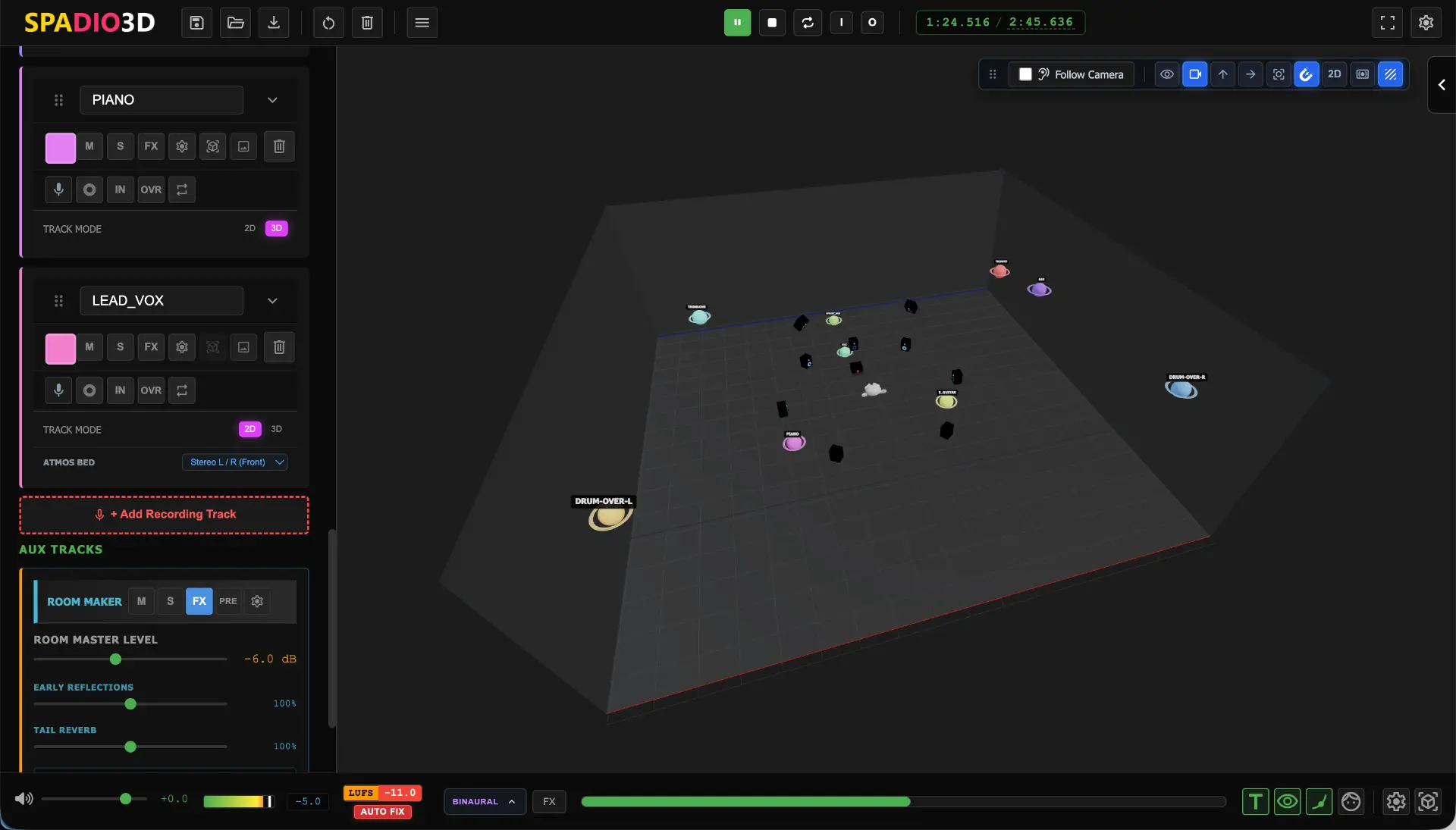
Drag a sound anywhere. Hear it move.
This is where you make your 3D sound. Drag any song, voice, or sound to where you want it: in front, behind, above, or right next to your ear. Draw a path and it moves for you. Record inside the app, use as many tracks as you like, and save your work for Dolby Atmos, games, or YouTube.
- Move sounds around a 3D picture. No hard setups to learn
- No track limit, and you can record right inside the app
- Head tracking with AirPods, Sony, Bose, or your webcam
- Save real Dolby Atmos files, and swap projects with REAPER
- On Mac, record from many microphones at once
Click to enlarge
Click to enlarge

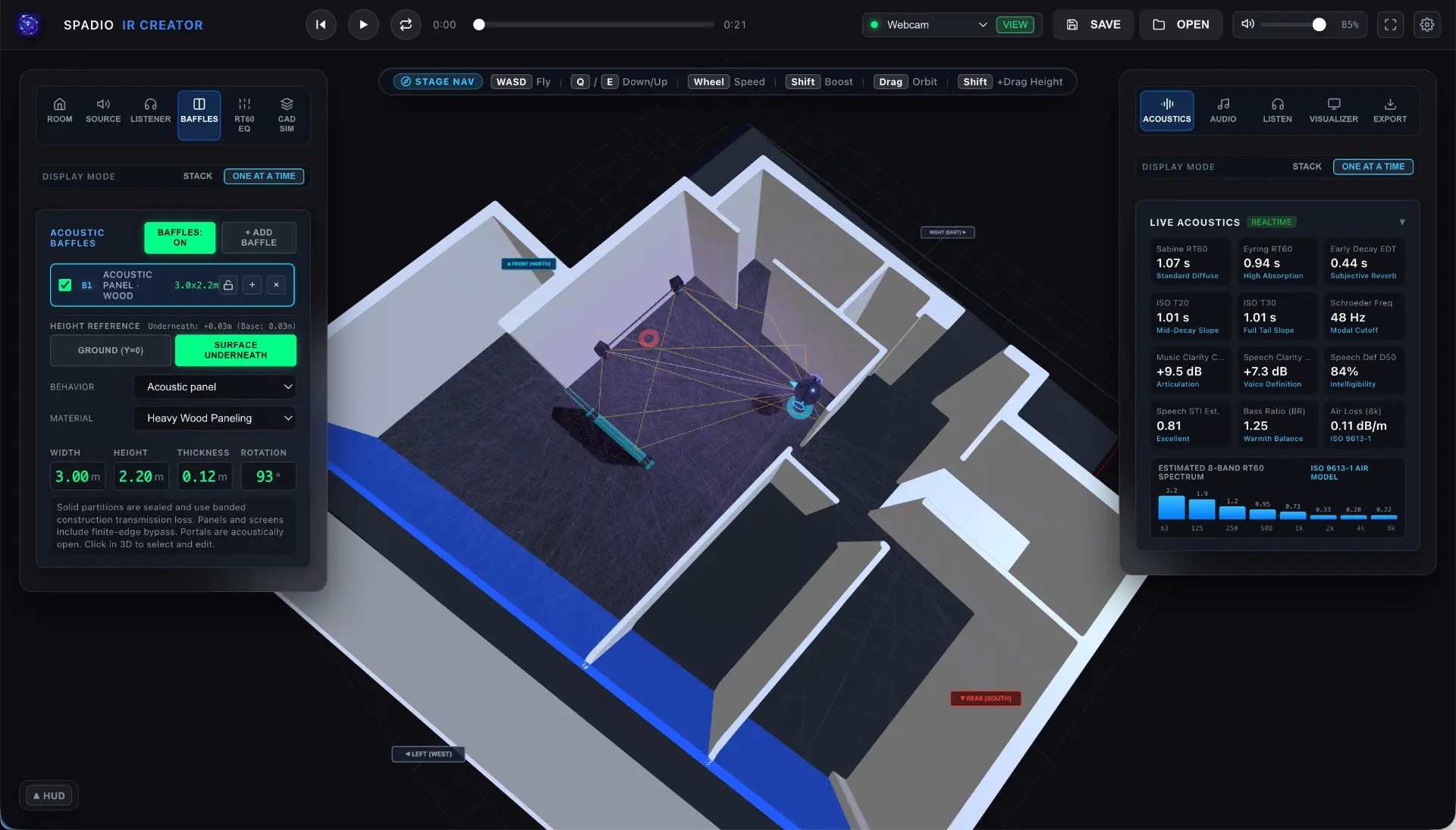
Build the sound of any room.
A voice sounds different in a bathroom, a church, and a concert hall. That is the room. With Spadio IR Creator you build a virtual room, pick its shape, size, and wall materials, and hear it right away. Then save it and use it as reverb (the echo of a room) in Spadio 3D or your favorite music software.
- Seven room shapes, or load your own 3D model
- Change walls and materials: wood, glass, concrete, and more
- Listen with headphones as you build, with head tracking
- Save for Spadio 3D, Logic Pro, Pro Tools, REAPER, and more
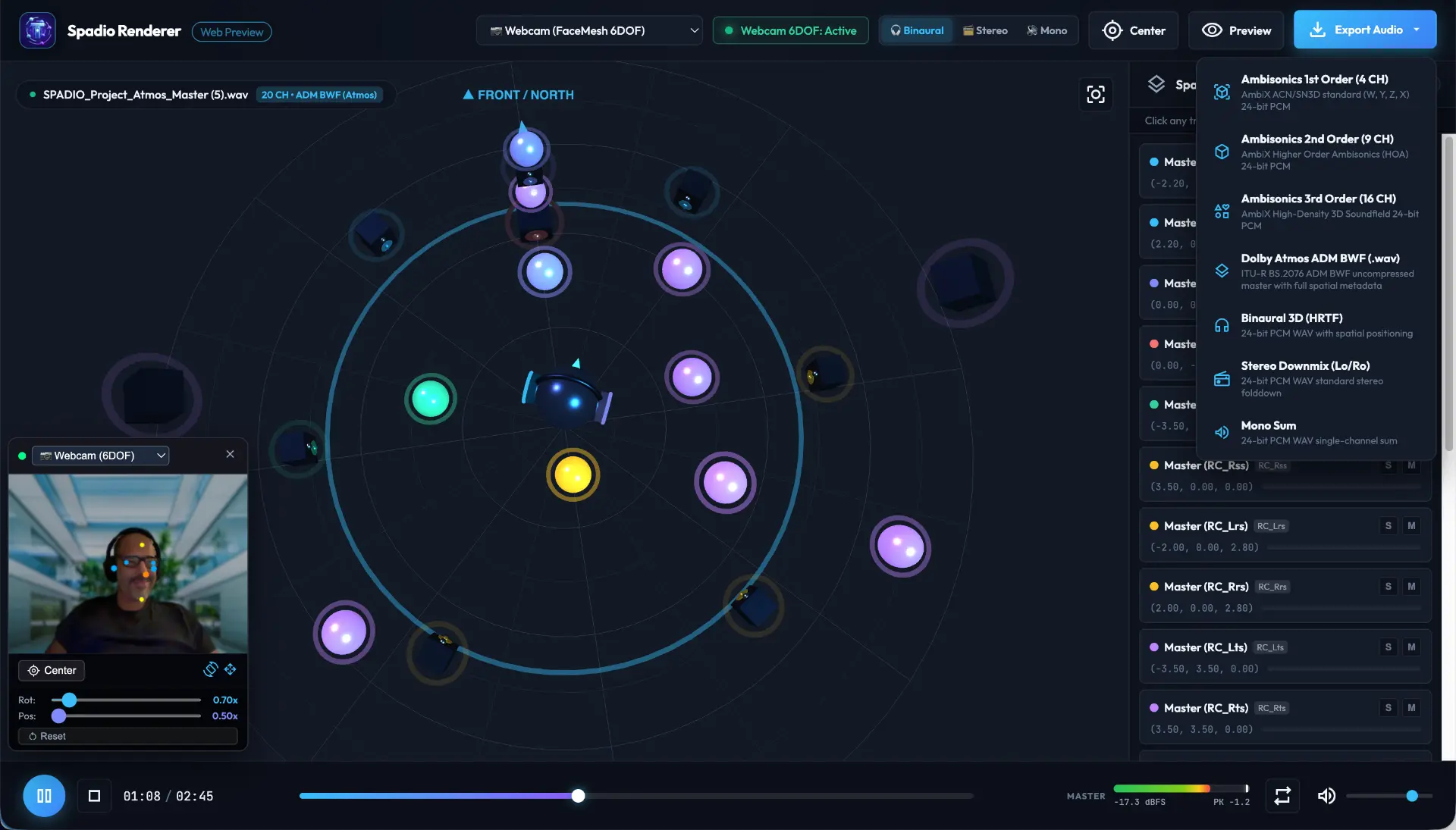
Play any 3D audio file. Change its format in one click.
Got a Dolby Atmos or 360° audio file and want to hear it now? Drop it into Spadio Hub. It plays right away, with no big software needed. Check how it sounds on regular stereo speakers or in mono. Then change it to another format when you are ready.
- Plays Dolby Atmos, 360° audio (Ambisonics), and surround files
- Works with head tracking on headphones
- Check stereo and mono with one click
- Convert between formats. Your files stay on your computer
Click to enlarge
Click to enlarge

Make big 360° audio files small.
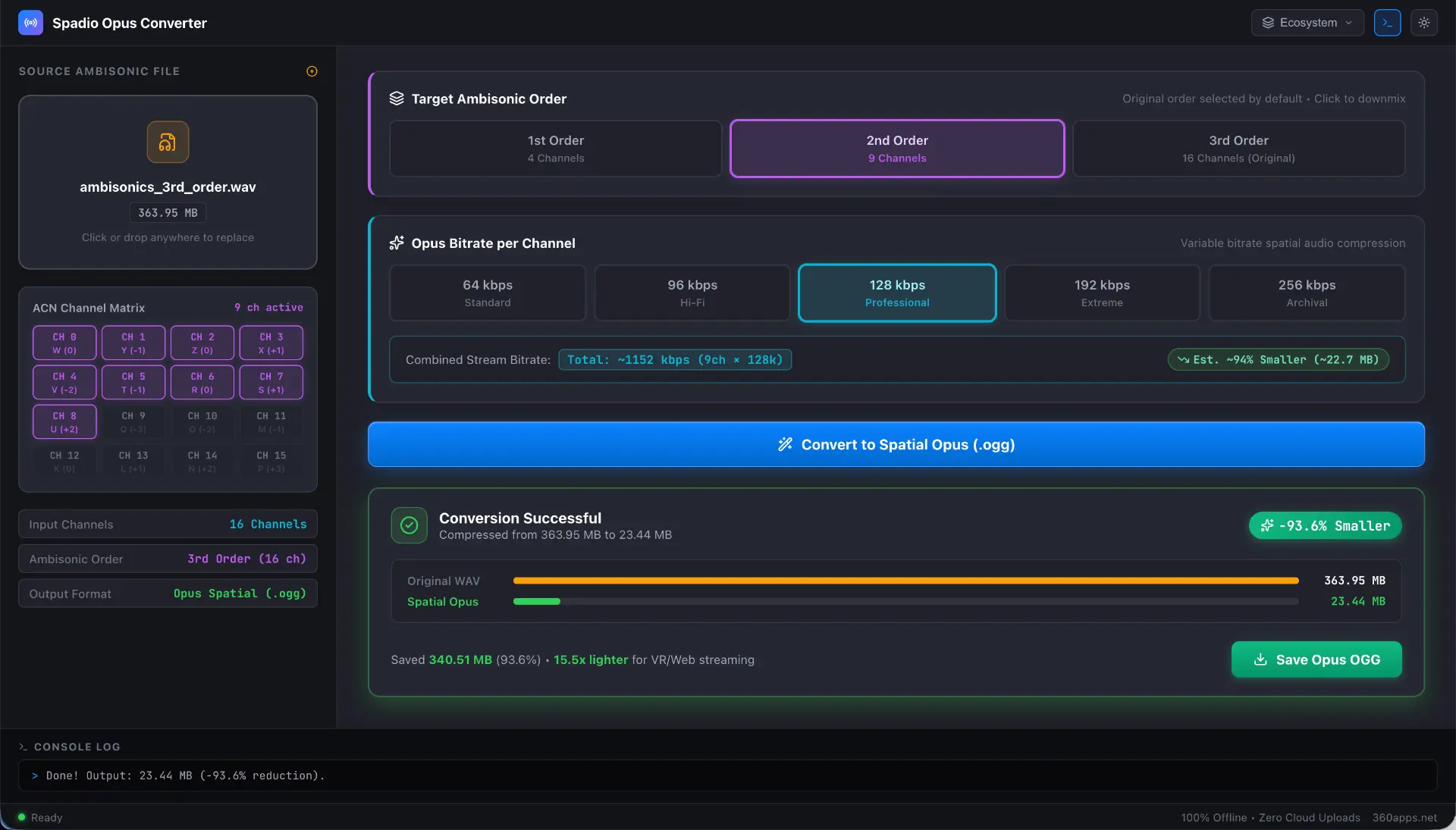
360° audio files can be huge, often hundreds of megabytes. That is too big for a website, a VR app, or a virtual tour. Spadio Ambix Compressor makes them up to about 90% smaller and keeps the 3D feeling. It runs in your browser, and your files never leave your computer.
- Works with 1st, 2nd, and 3rd order 360° audio
- Make a simpler, lighter version for phones and small headsets
- Made for websites, VR, YouTube 360, and virtual tours
- 100% private. Nothing is uploaded
What you can do
Simple tools. Big results.
Everything you need to make 3D sound, without the hard parts.
Drag sounds in 3D
Place any sound in front, behind, above, or beside the listener.
Draw moving paths
Draw a curve, a spiral, or an orbit once. Your sound follows it, and you can change it any time.
Record inside the app
Record straight into Spadio 3D. Any clean microphone works. The Mac app can record many microphones at once.
No track limit
Use as many tracks as your project needs. Tested with 128-channel Dolby Atmos projects.
Head tracking
Turn your head and sounds stay in place. Works with AirPods on Mac, Sony and Bose headphones, or your webcam.
Real Dolby Atmos files
Save Dolby Atmos files (ADM BWF), and open ones made somewhere else.
One-click loudness fix
Auto-Fix sets the right loudness for Apple Music, Spotify, and YouTube.
360° audio for games and video
Save Ambisonics for Unity, Unreal Engine, YouTube 360, and VR.
REAPER round trip
Send your project to REAPER, edit it there, and bring it back.
Room sound
Pick a room size and wall material and hear the echo change as you go.
Works on any headphones
Your listeners need nothing special. Any headphones or earbuds will do.
Optional VR editing
Open Spadio 3D in a VR headset browser (tested on Meta Quest 2) and move sounds with your hands.
Why Spadio
The old way vs. the Spadio way.
| The old way | With Spadio | |
|---|---|---|
| Listening | Multi-speaker studio rooms and special gear | Any headphones or earbuds |
| Setup | Hard routing and long setups | Drag a sound to where you want it |
| Head tracking | Extra hardware and add-ons | AirPods, Sony, Bose, or your webcam |
| Checking a 3D file | Open a big program and wait | Drop it into Spadio Hub and press play |
| Room echo | Record in a real room | Build a virtual room in IR Creator |
| Big 360° files | Hundreds of megabytes | Up to about 90% smaller with Ambix Compressor |
Who makes Spadio
Spadio is built by Dafar, a mixing engineer and world music producer in Amsterdam. He wrote “Mix – O Poder da Mixagem”, Brazil's first mixing guide.
Spadio was made for people who want great 3D sound without learning hard routing and steep learning curves. Pros can keep their favorite tools. Everyone else can start today.
Plain words
Spatial Audio words, made simple.
Heard a word you do not know? Here is what it means.
- Spatial audio (3D sound)
- Sound that feels like it comes from a place around you, not only from the left and right.
- Stereo
- Sound with two channels, left and right. This is what most music uses today.
- Binaural audio
- 3D sound made for headphones. It tricks your ears into hearing sounds in front, behind, or above you.
- Dolby Atmos
- A 3D sound format used by Apple Music, cinemas, and Dolby Atmos speakers. Spadio 3D saves Dolby Atmos files.
- ADM BWF
- The type of file that carries Dolby Atmos music. It holds the audio and where each sound sits in space.
- Ambisonics
- A 360° sound format used in games, VR, and 360 video. Spadio 3D can save it, and Ambix Compressor makes it smaller.
- Head tracking
- Your headphones, or your webcam, know how your head turns, so sounds stay in place like in real life.
- 8D audio
- Music that seems to circle around your head. It is basically binaural audio, and Spadio 3D exports it easily. A popular style on TikTok and YouTube.
- ASMR
- Soft, close sounds like whispers and taps that many people find relaxing.
- Impulse response (IR)
- The sound of a room saved as a file. You use it to add that room's echo to any sound.
- Reverb
- The echo of a room. A bathroom, a church, and a concert hall all sound different.
- DAW
- Software for recording and mixing audio, such as Logic Pro, Pro Tools, or REAPER.
Questions
Everything you need to know
Simple answers about 3D sound and the Spadio tools.
Spatial audio, also called 3D sound, makes a sound feel like it comes from a place around
you: in front, behind, above, or close to your ear. In normal stereo, sound only sits
between your left and right ear. With spatial audio you can also hear height, depth, and
movement, even on regular headphones.
Spadio is a set of easy tools for making 3D sound. Instead of sound coming only from the
left and right, you can place it in front, behind, above, or right next to the listener's
ear. It has four tools: Spadio 3D (where you make your 3D sound), Spadio IR Creator (build
the sound of a room), Spadio Hub (play and convert 3D audio files), and Spadio Ambix
Compressor (make 360° audio files small).
No. Spadio was made for people who are new to 3D sound. You drag a sound to where you want
it and you hear it move right away. There are no hard setups to learn. If you already use
Logic Pro, Pro Tools, or REAPER, you can keep working the way you like. Spadio fits
alongside them.
No. Any headphones or earbuds work, and so do the ones your listeners already have. If your
headphones have head tracking, sounds stay in place when you turn your head. AirPods Pro and
AirPods Max work in the Mac app. Sony and Bose headphones, and your webcam, work in the
browser too. No tracking headphones? Your webcam can do it instead.
You can open Spadio 3D in your web browser (Chrome, Brave, Safari, or Edge) with nothing to
install, and try it free. There is also an app for Mac on the Mac App Store.
There is no track limit. Use as many tracks as your project needs. We have tested Dolby
Atmos projects with 128 channels without any problems. You can record right inside Spadio
3D, and the Mac app can record from multi-channel audio interfaces, so you can capture many
microphones at once.
Yes. Spadio 3D exports real Dolby Atmos files (ADM BWF) that follow the official standard,
so they open in tools like Logic Pro, Pro Tools, and the Dolby Atmos Renderer. You can also
open Dolby Atmos files that were made somewhere else.
Yes. Spadio 3D saves Dolby Atmos files (ADM BWF) that open in Logic Pro, Pro Tools, and the
Dolby Atmos Renderer. You can also save regular multi-track audio files to keep working in
Nuendo or Ableton Live.
Yes. You can export a Spadio 3D project as a Cockos REAPER .RPP file. Your tracks, volumes,
and 3D sound movements come along, with the IEM plugins already added (you need to install
them once, and they are free). Your REAPER project comes already set up, with the hard
routing and plugin work done for you. Any edits you make in REAPER can be brought back into
Spadio 3D, so you can keep going.
Yes. Spadio 3D can save 360° sound files (called Ambisonics) that game tools like Unity and
Unreal Engine understand, and that YouTube 360 and VR players can play. It also works for
web games and web apps. Use Spadio Ambix Compressor to make the files small so they load
fast.
8D audio is music that seems to circle around your head. It is a popular style on TikTok and
YouTube. In plain words, 8D music is binaural audio, and Spadio 3D exports it easily. Draw a
circle path for any sound and it orbits the listener. No special setup is needed. Listeners
just need headphones.
Yes. Record with any clean microphone, even a simple mono one. Then draw the movement later:
a whisper that travels from one ear to the other, or taps that circle behind the listener.
You do not need a special 3D microphone.
Spadio 3D has a one-click loudness Auto-Fix. It sets your mix to the level each platform
asks for, so it does not sound too quiet or too loud.
Yes, as an extra. Open Spadio 3D in the browser of a VR headset such as the Meta Quest 2
(that is what we tested on), stand inside your sound scene, and move sounds with your hands.
It is optional. Everything also works on a normal computer.
Stereo has two channels: left and right. Surround adds more speakers around a room. 3D sound
(spatial audio) puts each sound at a point in space, so it can be above you, behind you, or
moving. It works on normal headphones, and also on Dolby Atmos speakers.
Spadio Hub plays 3D audio files the moment you drop them in, with no big software needed.
Check how a mix sounds on headphones, on regular stereo speakers, and in mono. Then convert
the file to another format with one click. Your files stay on your computer.
Every room has its own sound. Think of a bathroom, a church, or a concert hall. An "IR" is
that room sound saved as a file. With Spadio IR Creator you build a virtual room, pick its
shape, size, and wall materials, and hear it right away with headphones. Then save it and
use it as reverb in Spadio 3D or other music software.
IR libraries give you rooms that were recorded once, and they can never change. With Spadio
IR Creator you build the room yourself. Change its shape, move walls, and swap the materials
(wood, glass, concrete) until it sounds right. You can even load a 3D model, like a game
level, so the echo matches what people see. You hear it right away in 3D with headphones.
Then you save it as a normal file that works in convolution reverbs like Logic Pro's Space
Designer and REAPER's ReaVerb, or as 360° (AmbiX) files for VR and games. Keep your favorite
reverbs and libraries. Use IR Creator when you need a room that does not exist, or one that
must match your 3D scene.
It makes big 360° audio files much smaller, up to about 90% smaller, while keeping the 3D
feeling. That helps them load fast on websites, in VR apps, and in virtual tours. It runs in
your browser, and your files are never uploaded.
Spadio Hub, Spadio IR Creator, and Spadio Ambix Compressor work on your own computer. Your
audio files are not uploaded to a server.
Ready to hear your sound all around you?
Open Spadio 3D in your browser and try it now. Or get the Mac app.